

GoHighLevel Business Profile Settings: Setup Guide
If you just opened a new GoHighLevel account, the GoHighLevel Business Profile Settings screen is the first place you should go. Most users skip it. They click into the dashboard, start building funnels, set up automations, and forget that the settings panel even exists. Then, a few weeks later, they hit a wall trying to get A2P texting approved, or their branded links look unprofessional, or their emails fall out of compliance, and they realize the foundation was never set.
The whole thing takes about 5 minutes. There are five sections to fill out, each one controlling a specific part of how your account behaves: how your business is identified to telecom carriers, what domain shows on your shared links, who is on record as the authorized representative, how duplicate contacts are handled, and a handful of email and compliance defaults that quietly prevent a lot of headaches.
In this guide, I walk through every option in the Business Profile Settings panel and explain what each one does, when to enable it, and why it matters. Watch the video for the visual walkthrough or read below for the full reference. If you set this up correctly the first time, you never have to think about it again.
GoHighLevel Business Profile Settings: Setup Guide
The General Settings Section: Logo, Branded Domain, and Location ID
Business Friendly Name, Legal Name, Email, Phone, and Currency
Setting Up Your Branded Domain
Business Information and Why It Matters for A2P Texting
Business Physical Address, Time Zone, and Language
The General Preferences Most People Skip (and Should Not)
Merge Facebook Contacts and Facebook Lead Form Contacts
Disable Contact Time Zone (Leave This OFF)
Verify Email Address When First Email Is Sent
Default Unsubscribe Link in All Emails
Contact Deduplication Preferences
Why You Should Do This in the First Five Minutes of a New GoHighLevel Account
If you'd rather see this in action before diving into the steps, watch the full video walkthrough here or Watch "GoHighLevel Business Profile Settings: Every Option Explained" on Youtube
Where to Find Business Profile Settings in GoHighLevel
From your sub-account dashboard, click the Settings gear icon in the bottom-left corner. The first screen that loads is Business Profile. That is it. There is no hunting around for it. It is the very first thing in the settings menu, which tells you something about how GoHighLevel prioritizes it.
The Business Profile screen has five main sections, top to bottom: General Settings, Business Information, Business Physical Address, Authorized Representative, and General Information (the preferences block at the bottom). We will walk through each one.
The General Settings Section: Logo, Branded Domain, and Location ID
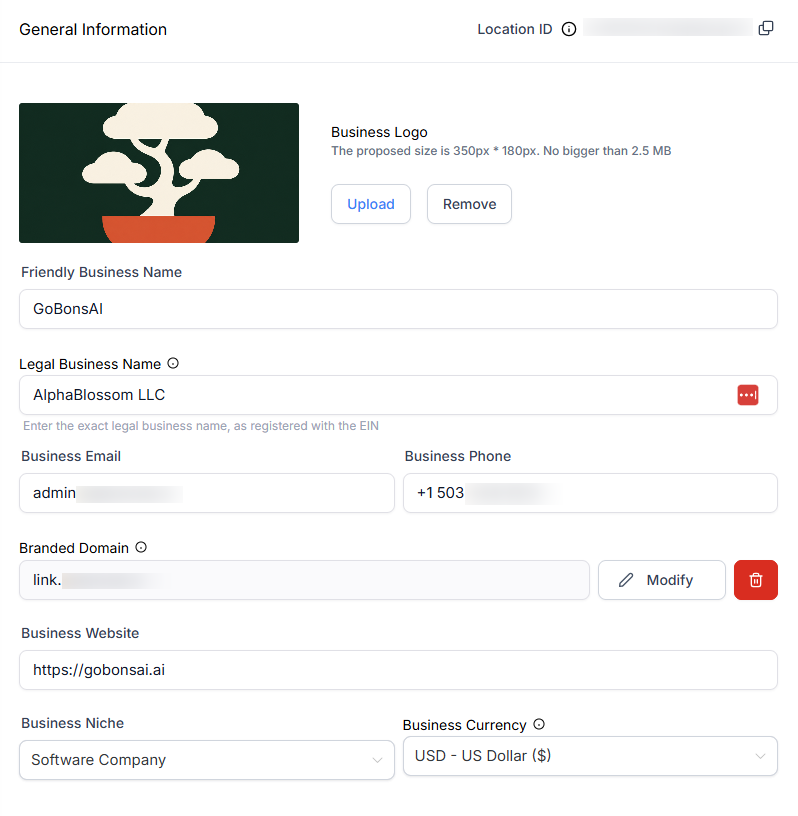
This is the top of the Business Profile page. It controls how your account is identified to your own customers and to support.
Business Friendly Name, Legal Name, Email, Phone, and Currency
The friendly name is what shows up internally and in shared links. The legal name is your registered business name (LLC, Inc, etc.) and it has to match what is on your business documents. The email here should be a real support or admin address you check, not a personal one. The phone number is the one your business uses publicly. The currency dropdown controls what your payment flows default to. If you are running a US-based business, US dollar is the choice.
Setting Up Your Branded Domain
This is one of the most overlooked settings and one of the most impactful. The branded domain is the URL that shows up when you share a direct link to a form, a calendar, or a payment link from your sub-account. Out of the box, the URL uses whatever the agency above you has configured (in our case it is link.alphablo.com), which looks fine but is not your brand.
You want a subdomain on your own root domain instead. For example, if your main website is gobonsai.ai, set your branded domain to link.gobonsai.ai. Subdomain is important because if you used the root domain directly, it would conflict with your website. The subdomain in front (link, share, go, etc.) gives you a clean separate URL space.
I always recommend hosting your domains on Cloudflare. Cloudflare is free, fast, and GoHighLevel has a direct integration so you do not have to log into your DNS host and add records manually. GoHighLevel also natively integrates with GoDaddy, Namecheap, and Ionos. When you click continue after entering your branded domain, GoHighLevel looks up where the domain is hosted and offers to automatically authorize the connection through the host's API. With Cloudflare it usually completes in 20 to 30 seconds. Worst case, DNS changes can take up to 48 hours, but in practice it is almost always under 15 minutes.
Uploading Your Logo
The logo appears in a few internal places and can show up on shared assets. GoHighLevel recommends 350 x 180 pixels and a maximum of 2.5 megabytes, but I usually use a square logo because it scales better across contexts. Use a PNG with a transparent background if you have one.
Business Information and Why It Matters for A2P Texting
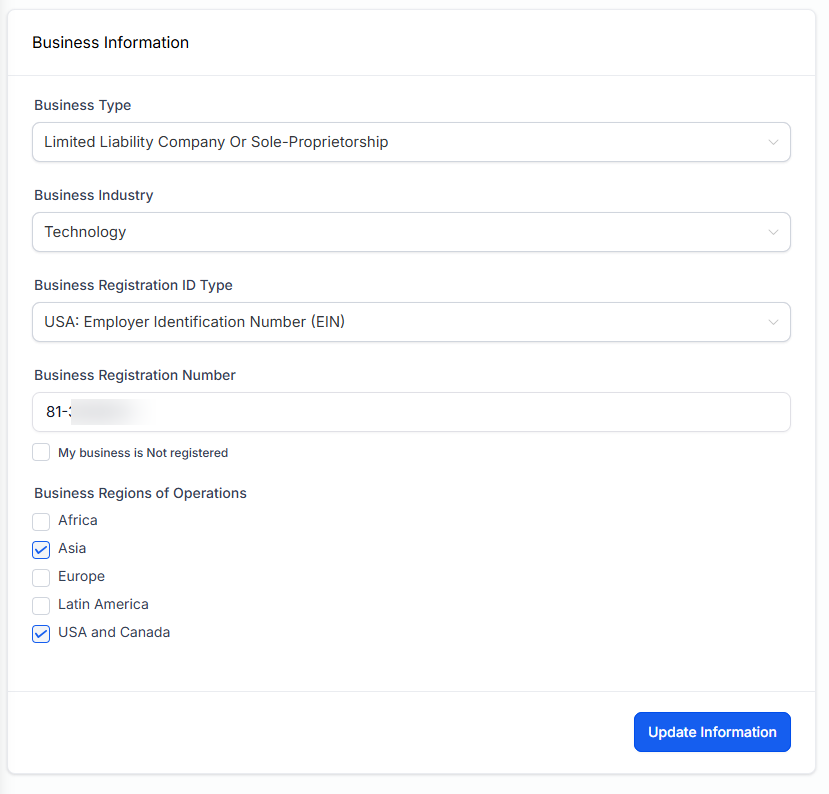
The Business Information section is where you enter the business type (LLC, Corp, sole proprietor, etc.), the industry, your business registration number, and which regions you operate in. For most US businesses, the registration number is your EIN (Employer Identification Number) issued by the IRS.
This is not just paperwork. When you later apply for A2P 10DLC certification (which is required to send SMS marketing or transactional texts at any meaningful volume in the US), GoHighLevel pulls the business information from this screen into the A2P application. If the EIN is missing or wrong, the application fails. If the business name does not match what the IRS has on file, the application fails. Setting this up correctly the first time saves you a frustrating back-and-forth with telecom approvals later.
Business Physical Address, Time Zone, and Language
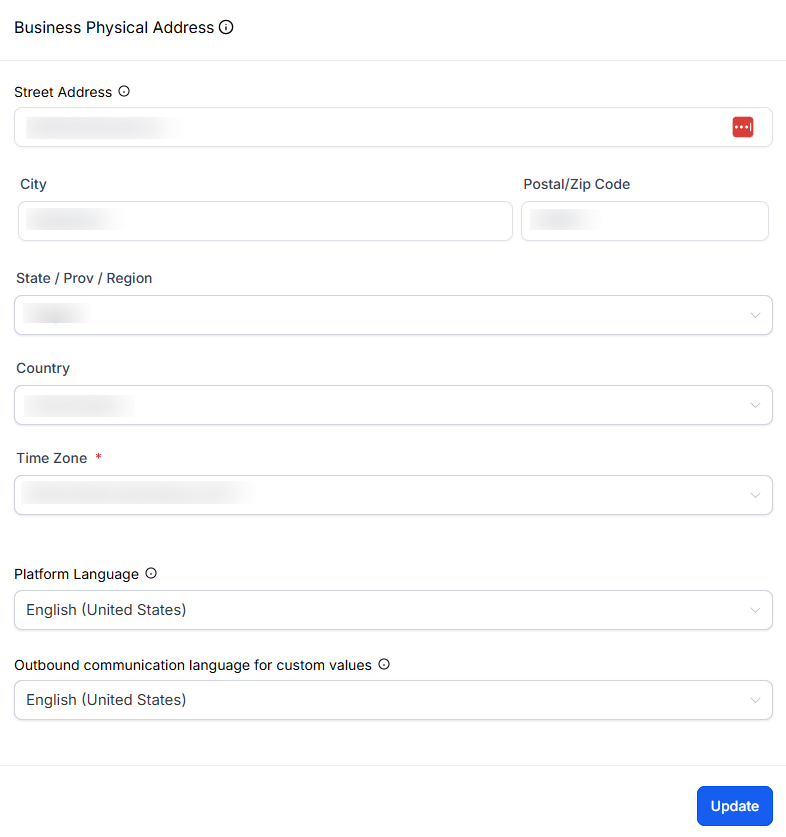
The address is your registered business address. Tax authorities and compliance review processes look at this, so make sure it is the real registered address, not a virtual mailbox unless that is actually your registered business address.
Time zone is a setting people get wrong all the time. Set this to where your business operates, not where your contacts live. GoHighLevel respects per-contact time zones for things like scheduled emails and appointment confirmations, so you do not need to fight the system by setting the account time zone to a contact's region.
The preferred language sets the platform default. The custom values language dropdown controls what language your merge tags default to. Right now the options are English and Spanish.
Authorized Representative
The authorized representative is the named individual on record for the account. This is used for legal and support reasons. Enter your legal name, your business email, your role (CEO, Founder, Manager, etc.), and your phone number with the country code. The phone number must include the country code (for example, +1 for US).
For most solo agency owners or founders, this is just you. For larger teams, it is the person legally responsible for the account. Get this right the first time, because changing the authorized representative later sometimes requires a support ticket.
The General Preferences Most People Skip (and Should Not)
This is the section at the bottom of the screen with the toggles. It looks innocuous and most users scroll past it. Each one of these toggles changes how your entire account behaves. Here is what matters.
Merge Facebook Contacts and Facebook Lead Form Contacts
If you are using Facebook Messenger conversations or running Facebook lead ads inside GoHighLevel, turn both of these on. They merge Facebook-sourced contacts with existing contacts in your CRM that have matching names. Without this, you will end up with two contact records for the same person, one from Facebook and one from however they originally entered your system. That makes reporting and follow-up automations much harder.
Disable Contact Time Zone (Leave This OFF)
Despite the name, this toggle forces your account's time zone onto all contacts. If you have it ON, a contact in Pacific time who schedules an appointment will see Eastern time slots if your business is in Eastern. That is a terrible booking experience. Leave this OFF. Let GoHighLevel use each contact's time zone for scheduling, confirmations, and reminders.
Bot Detection
This prevents bot clicks on email links from incrementing your statistics or accidentally triggering automations. If you are getting a lot of suspicious link clicks on outbound emails (often a sign of bot scanning), turn this on. For a brand new account or low email volume, you can leave it off and revisit later if your stats look suspicious.
Verify Email Address When First Email Is Sent
This one is worth the money. GoHighLevel charges $0.0025 per email verification (less than a third of a cent), and the first time you send to a new contact, it verifies that the email address is real before sending. This prevents you from blasting messages to typo'd addresses, fake sign-ups, and abandoned mailboxes, all of which hurt your sender reputation. Turn this ON.
Default Unsubscribe Link in All Emails
Turn this ON. This adds a default unsubscribe link to every outbound email automatically, which is required under CAN-SPAM and similar regulations. You can manually add unsubscribe links inside each email template, but it is easy to forget on a one-off email, and one missing unsubscribe can trigger spam complaints that hurt your deliverability or even get your sending account suspended. Let the default handle it. You can customize the unsubscribe text in the same section, just leave the unsubscribe merge tag in place.
Contact Deduplication Preferences
This controls how GoHighLevel decides if a new contact is actually a duplicate of an existing one. You can allow duplicates outright (do not do this unless you have a very specific reason), or you can choose to match on email first then phone, or phone first then email. I recommend email first for almost every use case. Email is the more reliable unique identifier for most B2B and online businesses. Match on email first, fall back to phone if the email field is empty.
Why You Should Do This in the First Five Minutes of a New GoHighLevel Account
Every single one of these settings touches something that comes back to bite you if it is wrong. A2P approvals depend on the business information. Email deliverability depends on the unsubscribe link and email verification. Sender reputation depends on bot detection and dedup rules. Branded URLs depend on the domain setup. Contact data quality depends on the dedup rules and the Facebook merge toggles. None of this is exciting, but all of it is foundational.
Open a new account, go to settings, fill in this one screen, save. Five minutes. You never have to look at it again. If you skip it and try to fix things later, you are debugging instead of building. We cover similar foundational setup steps in our guide to transferring sub-accounts cleanly between agencies, where the Business Profile is one of the first things the receiving agency wants to verify.
Related Links
Related Videos
Video Transcript
[0:00] Hey there. In this short video, I'm going to show you a very simple setting inside of your high level account. If you're an Apple Blossom member, you should already have this set up. But I see a lot of people's accounts where they just don't take the time to go through and completely set this up. And it's very important. And And that is your main settings. When you get your first account, you have a settings panel where you need to add business information, set up your branded domain and a few other key settings. just thought I'd record a short video and walk you through that really quickly and show you what those different settings are, so you have a full understanding of what they are and why it's so important.
[0:31] So let's just jump straight into it. I'll show you how to do that if you're not already subscribed to the channel, click that subscribe button down below. Like this video. And don't forget to turn on notifications for new videos as well. And if you are new to high level or if you're considering it, I have a 30 day free high level trial down below, and that includes a free bootcamp that will help you get up and running quickly, as well as my free community. You can join down below where I'm happy to answer any questions and help support you on your journey. So with that said, let's just jump into it and I'll show you the settings panel and explain everything to you.
[1:01] I'll see you on the other side. So here we are. This is a brand new account we're working in. I'm actually going to switch into different accounts. So let me just do that really quickly. All right I'm inside a brand new account. This is for my new social media app that helps you post consistently on all your social media channels that are supported inside a high level. This app will generate social media posts in your brand, in your voice. They sound like you wrote them, and you can do a month or two months worth of posts in just a few minutes. Super awesome. And so I'm going to use my high level account inside of my Apple Blossom CRM to do all the marketing, all the set up and automation for this app.
[1:50] And so we're going to just go down in the settings and you'll land right away on business profile. So this is the screen I wanted to just go over really briefly with you So this is just where you set up your business profile exactly as it says. And there's a couple sections here. One is your general information. This is also where you can grab your location ID. So if somebody asks you for support where is your location ID you can just copy it here. You can also see that's always in the URL as well. So that's an easy way to find it as well. general settings is where you give your business information, upload your logo, your branded domain.
[2:21] This is the domain that you're going to use, for your general links that you share. Like if you created a form and you just wanted to share that form directly, not have it embedded into a website or anything, but just give somebody the link to that form or a payment link or a calendar link. This is where you can set that domain up. then is business information. So this where you can enter your information. What type of business if you have a business registration number for example, a lot of you will have an ID number. You can enter that here. This is helpful later to enter your year and number in entering this. If you go to get A2P certified, which is what's required to use the software to send out text messages, it'll pull this information here.
[3:02] That's required for that process as well. And then next we have your business physical address, your authorized representative, who's the authorized representative for the account? Just for good, for legal reasons and as well as support and then some general settings. I'll just touch on these really quick as well as, how you want to handle, potential duplicate contacts. let's just get started here. I'm going to fill this out. I've already got some of this stuff here. So first, is the business friendly name. And then I'm going to add my legal business name, which is Alpha Blossom LLC. So this is currently part of my Alpha Blossom business. And then for the email I'm going to say admin ad.
[3:37] Go back inside that I already got my phone number there. Software company and the business currency is going to be US dollars. So you can handle different currencies for your payments. I'm doing everything in U.S. dollars. I'm going to update this information now. I'm going to do the branded domain now, just to show you guys how it works. And again, what this does is if you have like, just forms or calendars or calendars, you can actually set a different URL, but forms payment links, things like that, where you're not embedding it into a funnel or something that you just want to send somebody. The direct system link opens up the form and they can fill it out.
[4:10] Right now it's going to use whatever domain the agency has. In my case, it's, link dot alpha blossom.com, but I want to change that to mine. So I'm just going to say link.gov. And that I and. You probably going to be using your main domain for a website things like that. So technically you could use that here, but then you would not be able to use it anywhere else. So the workaround is you have a subdomain that goes in front of it. And as long as you're not using this somewhere else, you can use whatever you want here in the front part. So for me, it's going to be lingo. Com and I always recommend having your domains hosted in Cloudflare.
[4:44] I've got other videos showing you how to do that. If you don't have that set up already you can do this with some other, domain hosts like GoDaddy. Namecheap and I think I and also the ones that are supported natively. And when I say supported natively, that means that they'll just connect automatically through the API. You don't have to log into those platforms and do anything. And so we're just going to click continue. And I've already got Cloudflare. It may ask me to log in, but it's going to look for my Cloudflare settings. Here. The provider details. So it's going to search the domain, see who it's registered with. And then it's going to give you the option of automatically connecting that.
[5:19] And now you can see it's retrieving my records. It's finalizing the set up. And then it's just going to ask me to authorize the domain through Cloudflare. It shows you what records are going to be added. I'm going to authorize that. And it says it could be 30s before the changes go through. And then this panel will close automatically here, once it's approved. So usually 20 to 30s and you're done. Keep in mind sometimes when you add domains it can technically take up to 48 hours. The longest I've seen recently has been ten 15 minutes, but usually it just goes through right away. So now you can see I've got that there. So now if I share, say a form, it's going to start with link that grandmother that I and then the link to the form.
[5:54] All right. So I'm just going to update that one more time. And then I'm going to upload my logo here. Also it tells you what sizes and all that to use. I uses a square but you can also go with the recommended size. The heavier is 350 by 180 and no bigger than 2.5MB. So let's update that. And if for your information going to to just complete this what type of business you have I have an LLC. And what's the industry I'm using in and what's the M number. And then what regions you're going to be operating in. So there's no changes there. So no need to and then physical address. You want to know your business address.
[6:28] What's your time zone that you're doing business in What's the preferred language for the platform. And then for custom values. What language do you want that to default to. So the only options are English and Spanish. So I'm using English. So we'll update that. then for Authorized Representative, just enter your information here. I'm going to enter my legal name, Anthony. I got my Tony and my email. Let's just say info at Alpha blossom.com. That's my main business email founder. Actually this is a drop down. So you can select whatever you want. I'm going to say SEO and then my phone number with the country code plus one into your phone number. And an update that information.
[7:06] And then we just have one more section to go over really briefly here the general information. So some of these here you see in these kind of peach boxes they used to have the settings in here. So that's why they now have a information box that gives you the link to go directly for those. But the ones we're going to cover is Merge Facebook contacts, my matching contact name. So if you are using Facebook Messenger through our platform, you can merge those contacts with existing contact name. So I want to do that. And I also want to do that if I'm getting Facebook lead form submission. So if I have forms on a Facebook ad where the forms are being filled up inside of Facebook, then I can pull that data inside of our platform and I can merge those contacts.
[7:46] So if I already have an existing contact that matches, this will merge them together. Disable contact time. So I recommend not disabling that because this way if you contact the scheduling an appointment, for example, time zone is going to be appropriate to where they are located as opposed to your time zone. So it can get really confusing if you're forcing your times on another people. But detection, preventing statistics increment and automation execute. There's a little icon here. if you're worried about box clicking links and things in emails, you can disable this and it'll prevent those bots from being put through different automations and things like that. From the campaign. So you can click that if you want.
[8:21] I'm just gonna leave it off right now. This is a brand new account, so I don't imagine it's going to be a problem, but just be aware that exists if you need to come back and turn that off. Verify email address. When the first email sent. This is really important for your email sending. You want to make sure you're not sending to broken emails, somebody mistyped or just somebody trying to spam you. And so there is a small cost here. It's 0.002 $0.05 per email verification. And basically the first time it's going to send an email to a new contact, it's going to verify that email to make sure it's a legitimate email. So I'm going to turn that on.
[8:52] then the last one is on by default I recommend keeping this. But this adds a default unsubscribe link to our email so that you make sure you're always in compliance. If you don't have that, it can be real problems for spam and even getting you shut down with your emails and ability. You can manually add it to emails, but it's really easy to forget as you start doing more with email. So I would leave that on. You can customize it here. And the other thing is you need to make sure you have this unsubscribe, merge tag in here. But everything else you can customize. So I'm going to say if you no longer wish to receive these emails you may unsubscribe from, go Banzai marketing.
[9:24] Emails. We'll just leave it at that. So if it's somebody then I'm doing transactional emails. I still want to be able to send those to them, so we can that. And then the last one is deduplication preferences for contacts. how are you going to handle duplicate contacts. So if you want to allow duplicate contacts you can turn that on. Otherwise you can decide you want to find existing contacts based on email first and then phone. Or do you want to reverse that phone first? I'm going to use email because that's the most commonly used. And so now if I have a contact comes in, if it's the same email it's going to merge those contacts automatically.
[9:46] And then it's going to look at phone number second. And then the last one is miss callback setting that's been moved over to the call settings as well. that's really it. I mean the screen is very important. It only takes five minutes to go through and set this up. But I recommend that everybody does this as soon as you get to your account set up get it set up once and then you're done. You don't have to worry about this ever again. right, that's it guys and gals. So as I said in the video, I really recommend just when you as soon as you get to new account, just take five minutes and go through here and completely fill it out.
[10:14] It's done. It's behind you. And it's going to just help you throughout the app in different ways. So it's really important to come in and just get this set up right the first time. Once it's done five minutes, you can move on to other things. So that's it. If you like this video, make sure to subscribe down below. Click the like button on the video, and I will be sure to bring some other helpful videos to you. And if you're looking to get started, high level or if you're looking to upgrade to a higher agency plan, I've got my affiliate links down below. I'm happy to help in any way I can. And also, if you're signing up for a new high level account, I've got a 30 day free trial down below, as well as a free bootcamp.
[10:57] That helps you get up and running quickly with that. So that's it. I will see you in the next video.